
Key facts
Start here
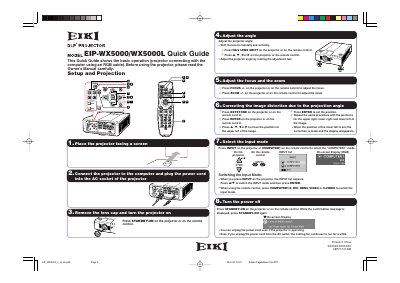
EIKI EIP-WX5000/WX5000L DLP Projector Quick Guide
This document serves as a Quick Guide for the EIKI EIP-WX5000 and EIP-WX5000L DLP projectors. It provides basic instructions for setting up the device, including connecting it to a computer via an RGB cable and powering it on. The guide covers essential steps such as adjusting the lens shift, focus, and zoom, as well as configuring the keystone correction for the image.
Read onlineEIKI EIP-WX5000 specifications
| Lens Type (Standard) | AH-55501 |
|---|---|
| Lens Type (Fixed Wide) | AH-55201 |
| Lens Type (Tele-zoom) | AH-55601 |
| Lens Type (Tele-zoom) | AH-55701 |
| Lens Type (Tele-zoom) | AH-55801 |
| Lens Type (Wide-zoom) | AH-55401 |
| Lens Type (Fixed Wide) | AH-55301 |
Source: EIKI EIP-WX5000/EIP-WX5000L DLP Projector Setup Manual
All EIKI EIP-WX5000 documents by type
Day-to-day operation, settings and troubleshooting. Start here if the product is already set up.
The shortest path to a working setup, usually only a few pages.
Questions answered in these manuals
How should the projector be positioned for optimal image quality?
Position the projector perpendicular to the screen with the projector's feet flat and level to eliminate the need for Keystone correction.
From: EIKI EIP-WX5000/EIP-WX5000L DLP Projector Setup Manual
What should be done if the projected image is reversed?
Readjust the setting to “Front” in the “PRJ Mode” menu.
From: EIKI EIP-WX5000/EIP-WX5000L DLP Projector Setup Manual
What cable is required to connect the projector to a computer?
The guide specifies connecting the projector to the computer using an RGB cable.
How do you adjust the horizontal and vertical lens position?
Press H&V LENS SHIFT on the projector or remote control, then press A, V, 4, or P to move the image.
What safety warning is given about the projector's light source?
Do not stare into the beam of light, or view directly, and be especially careful that children do not stare directly into the beam.
What type of plug is fitted to the mains lead for users in the U.K.??
The mains lead is fitted with a non-rewireable (moulded) plug incorporating a 13A fuse.