
Key facts
- Brand
- Delta
- Model
- CME-DN01
- Documents
- 4
- Languages
- EN · ZH
- Last added
- 2012-01-01
Start here
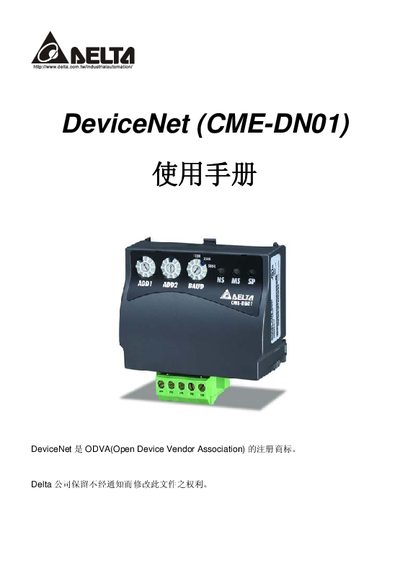
Delta CME-DN01 DeviceNet Communication Adapter User Manual
The Delta CME-DN01 is a DeviceNet communication adapter that connects directly to a VFD and acts as a gateway for DeviceNet and MODBUS networks. It provides eight I/O addresses, requires no external power supply, and draws 15 V from the VFD via the RS‑485 connection.
The manual includes a preface, an overview of hardware and specifications, a quick installation guide, configuration settings, error message descriptions, and troubleshooting steps. Appendices provide detailed installation information, DeviceNet object definitions, and instructions for using the Auto EDS Generator software. This manual is written in Chinese.
Delta CME-DN01 specifications
| Dimensions (L×W×H) | 72.2 mm × 35.8 mm × 3.5 mm |
|---|---|
| Baud rate options | 0 = 125 Kbps, 1 = 250 Kbps, 2 = 500 Kbps |
| Power supply | No external power; supplied via RS‑485 port |
| LED indicators | Three LEDs (SP, Module, Network) show normal/abnormal status |
Source: Delta CME-DN01 Communication Module Instruction Sheet
All Delta CME-DN01 documents by type
Day-to-day operation, settings and troubleshooting. Start here if the product is already set up.
Questions answered in these manuals
How is the CME‑DN01 powered?
The module does not require an external power source; it receives power through the RS‑485 connection to the VFD‑E.
What do the three LED indicators indicate?
The SP LED shows green for normal and red for abnormal; the Module LED blinks green when no MO data is transmitted, stays green when data transmission is OK, and red indicates abnormal communication; the Network LED is green for normal DeviceNet communication and red for abnormal.
How is the CME‑DN01 powered?
The module does not require an external power source; power is supplied through the RS‑485 connection to the VFD‑E.
From: Delta CME-DN01 DeviceNet Communication Module User Manual
What do the LED indicators on the CME‑DN01 signify?
SP green means normal, red means abnormal; Module green blinking indicates no I/O data, green steady means I/O data OK, red indicates abnormal; Network green shows normal DeviceNet communication, red shows abnormal.
From: Delta CME-DN01 DeviceNet Communication Module User Manual
How many I/O addresses does the CME-DN01 provide?
The CME-DN01 provides eight I/O addresses.
From: Delta CME-DN01 DeviceNet Communication Adapter User Manual
Does the CME-DN01 need an external power supply?
No, it receives 15 V power from the VFD through the RS‑485 connection.
From: Delta CME-DN01 DeviceNet Communication Adapter User Manual