
Key facts
- Brand
- Delta
- Model
- DVP04DA-S
- Industry
- Industrial
- Documents
- 3
- Languages
- EN
- Last added
- 2011-11-17
Start here
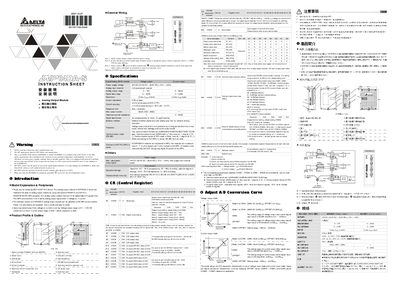
Delta DVP04DA-S Analog Output Module Installation Guide
The DVP04DA-S is an analog output module for Delta DVP PLC series. It receives 12‑bit digital data from the PLC and converts it to four analog outputs, selectable as voltage (0‑10 V) or current (0‑20 mA). The module is open‑type, designed for installation in a protected enclosure and can be updated via RS‑485.
The manual covers safety precautions, mechanical mounting, external wiring, RS‑485 communication setup, control register settings for output mode, and detailed technical specifications such as voltage/current ranges, power supply, accuracy, and environmental limits.
Delta DVP04DA-S specifications
| Voltage output range | 0 V ~ +10 V DC (resolution 2.5 mV) |
|---|---|
| Current output range | 0 mA ~ 20 mA (resolution 5 µA) |
| Power supply voltage | 24 V DC (20.4 V ~ 28.8 V DC) |
| Output impedance | ≤ 0.5 Ω |
| Overall accuracy | ±0.5 % FS at 25 °C, ±1 % FS 0 ~ 55 °C |
| Response time | 3 ms per channel |
| Maximum output current | 20 mA |
| Communication mode | RS‑485 (ASCII/RTU, 4.8 kbps‑115.2 kbps) |
Source: Delta DVP04DA-S Analog Output Module Installation Guide
All Delta DVP04DA-S documents by type
Mounting, wiring and first power-up. Read it before the hardware goes in.
Questions answered in these manuals
How can the output mode be selected between voltage and current?
The output mode is chosen by wiring: voltage output provides 0 V ~ +10 V DC (2.5 mV resolution) and current output provides 0 mA ~ 20 mA (5 µA resolution). Mode settings can also be programmed via Control Register #1.
From: Delta DVP04DA-S Analog Output Module Installation Guide
What communication options are available for the module?
The module supports RS‑485 communication with selectable baud rates of 4,800 to 115,200 bps and can operate in ASCII (7 E 1) or RTU (8 E 1) format.
From: Delta DVP04DA-S Analog Output Module Installation Guide
What is the recommended tightening torque for the I/O terminal block?
The tightening torque for the I/O terminal block is 1.95 kg‑cm (1.7 in‑lbs).
How can the input mode be selected for a channel?
The input mode is set via the channel’s control register (CHx) using values such as 0 for voltage ±10 V, 1 for current ±20 mA, etc.
What torque should be used when tightening the I/O terminal block?
The recommended tightening torque is 1.95 kg‑cm (1.7 in‑lbs).
From: Delta DVP04DA-SL Analog Output Module Installation Guide
What safety step must be taken before performing maintenance?
The DC input power must be turned off and you must wait at least one minute before touching any internal circuitry.
From: Delta DVP04DA-SL Analog Output Module Installation Guide