
Key facts
Start here
Dell IE600 Headset Quick Start Guide
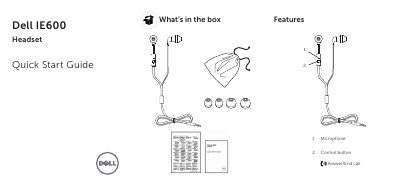
This Quick Start Guide from Dell covers the IE600 headset. It lists what is included in the box (headset and Quick Start Guide) and describes the headset's features, including the microphone and the control button used to answer or end calls.
The guide explains how to plug in the headset and select it in the device-selection window, and how to enable the auto pop-up dialog through Dell Audio in Windows. It notes that Dell Audio is required for the headset control button to work with your computer, and refers users to the User's Guide at dell.com/support/manuals for more information.
Dell IE600 specifications
| Model number | IE600 |
|---|---|
| Supported operating systems | Windows 7, Windows 8, Windows 8.1, Windows 10, Android |
| Weight | 11 g without packaging |
| Plug | 3.5 mm 4-pole |
| Cord length | 1.3 m |
| Operating temperature | 0° C to +45° C |
| Storage temperature | 25° C to 70° C |
Source: Dell IE600 Headset User's Guide
All Dell IE600 documents by type
The shortest path to a working setup, usually only a few pages.
Day-to-day operation, settings and troubleshooting. Start here if the product is already set up.
Questions answered in these manuals
What is the control button on the Dell IE600 used for?
The control button is used to answer or end a call.
Why is Dell Audio needed for the IE600 headset?
Dell Audio is required for the headset control button to work with your computer.
What is included in the package?
The package includes a headset, 2 ear cushions, a travel pouch, and documents.
How do I connect the headset to a computer?
Plug the headset into the computer, then select Headset in the device-selection window and click OK.