
Key facts
- Brand
- DELL
- Model
- J-SRX210
- Category
- Other network devices
- Documents
- 2
- Languages
- EN
- Last added
- 2023-11-25
Start here
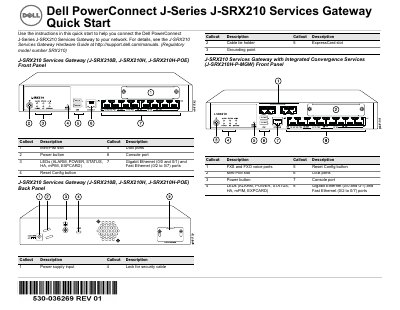
Dell J-SRX210 Services Gateway Quick Start Guide
This Quick Start Guide provides instructions for connecting the Dell PowerConnect J-Series J-SRX210 Services Gateway to a network. It covers physical setup steps including grounding, power connection, and connecting a management device via Ethernet or console port. The guide details how to verify LED status and wait for the device to boot.
Read onlineDell J-SRX210 specifications
| DDR Memory | 512 MB (J-SRX210B) |
|---|---|
| DDR Memory | 1 GB (J-SRX210H) |
| Power over Ethernet | 50 watts across 4 ports |
| DHCP Server IP | 192.168.1.1/24 |
All Dell J-SRX210 documents by type
Day-to-day operation, settings and troubleshooting. Start here if the product is already set up.
The shortest path to a working setup, usually only a few pages.
Questions answered in these manuals
What product does this hardware guide cover?
It covers the Dell PowerConnect J-Series J-SRX210 Services Gateway.
From: Dell PowerConnect J-Series J-SRX210 Services Gateway Hardware Guide
When was this hardware guide published?
It was published on 2010-06-16.
From: Dell PowerConnect J-Series J-SRX210 Services Gateway Hardware Guide
What is the default IP address for the management device?
The management device should acquire an IP address on the 192.168.1/24 subnetwork, other than 192.168.1.1.
What are the default login credentials for the J-Web interface?
The default user name is root, and the Password field should be left empty.