
Key facts
Start here
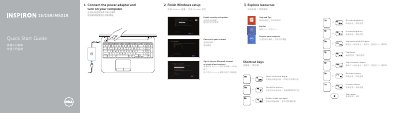
Dell Inspiron 15/15R/M531R (3521/5521/15-3537/15R-5537/M531R-5535) Laptop Quick Start Guide
This quick start guide is for Dell Inspiron 15/15R/M531R laptops, covering the Inspiron 3521/5521/15-3537/15R-5537/M531R-5535 series. It outlines Windows setup steps, shortcut keys, and a labeled diagram of hardware features.
It also identifies ports and indicators, plus links for product support, manuals, regulatory compliance, and safety information.
Dell Inspiron 3521 specifications
| Modelos del equipo | Inspiron 3521/5521/5537/3537 |
|---|---|
| Modelo reglamentario | P28F |
| Tipo reglamentario | P28F001/P28F003 |
| Copyright year | 2012-2013 |
| Revision | A02 |
Source: Dell Inspiron 15/15R 3521/5521/5537/3537 Owner's Manual
All Dell Inspiron 3521 documents by type
Disassembly, diagnostics and part numbers, for repair.
- Dell Inspiron 3521/5521 Laptop Service Manual 96 p
- Dell Inspiron 15/15R Owner's Manual 69 p
- Dell Inspiron 15/15R User Manual 65 p
- Dell Inspiron 3521/5521 Service Manual 96 p
- Dell Inspiron 3521/5521 Owner's Manual 96 p
- Dell Inspiron 15/15R 3521/5521/5537/3537 Owner's Manual 69 p
- Dell Inspiron 15/15R User Manual 69 p
- Dell Inspiron 3521/5521 Service Manual 94 p
- Dell Inspiron 15/15R (3521/5521/5537/3537) Owner's Manual 69 p
- Dell Inspiron 3521/5521 Service Manual 96 p
- Dell Inspiron 3521/5521 Owner's Manual 94 p
The shortest path to a working setup, usually only a few pages.
Day-to-day operation, settings and troubleshooting. Start here if the product is already set up.
Questions answered in these manuals
What tools are recommended for the procedures?
A Phillips screwdriver and a plastic scribe.
Where is the service tag located?
On the back of the computer.
What models does this manual cover?
This manual covers the Dell Inspiron 3521, 5521, and 5537 computer models.
What tools are recommended for this repair?
The recommended tools are a Philips screwdriver and a pointed plastic instrument.
What tools are needed for disassembly?
You may need a Phillips screwdriver and a plastic spudger to perform the steps in this guide.
How do I remove the battery?
Flip the computer over, slide the battery latches to the unlocked position until you hear a click, and lift the battery out.