
Key facts
Start here
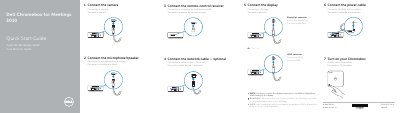
Dell Chromebox for Meetings 3010 Quick Start Guide
Dell Chromebox for Meetings 3010 Quick Start Guide describes connecting the camera, microphone/speaker, remote-control receiver, optional network cable, display, and power cable, then turning on the Chromebox. It also lists product features and steps to finish setup, including network verification, Google account sign-in, and video, audio, and microphone testing.
The guide is presented in English, French, and Spanish and includes Dell and Google support contacts plus regulatory information.
Dell Chromebox for Meetings 3010 specifications
| Regulatory Model | Z01V |
|---|---|
| Regulatory Type | Z01V001 |
| Minimum Bandwidth | 1 mbps or 2mbps (up/down) |
| Mounting Space (Device) | 50 mm x 145 mm x 145 mm |
| Mounting Space (Speakerphone) | 55 mm x 140 mm x 150 mm |
| Recommended Room Size | 3-6 person conference room |
| Minimum Screen Resolution | 1280 x 720 pixels |
| Recommended Screen Resolution | 1920 x 1080 pixels |
All Dell Chromebox for Meetings 3010 documents by type
Day-to-day operation, settings and troubleshooting. Start here if the product is already set up.
The shortest path to a working setup, usually only a few pages.
Questions answered in these manuals
What are the network requirements for the Chromebox for Meetings?
The device works with both wired and wireless networks, but a wired connection is recommended for best sound and video quality.
What display inputs does the Chromebox for Meetings support?
It supports LCD, LED, plasma, and projector-type monitors and televisions with HDMI or DisplayPort inputs.
What must I do after turning on the display?
Switch the display's input source to HDMI or DisplayPort.
Which items are tested during Chromebox setup?
Video, audio, and microphone are tested.
Do I need to switch the display input source after turning on the display?
Yes, switch the display's input source to HDMI or DisplayPort after turning on the display.
Is the network cable required?
No, connecting the network cable is optional.