
The Dell Chromebox for Meetings 3010 Quick Start Guide provides instructions on how to connect and use the device.
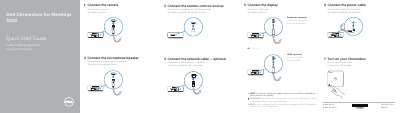
This document is a Quick Start Guide for the Dell Chromebox for Meetings 3010. It outlines the physical connections required to set up the device, including the camera, microphone/speaker, remote-control receiver, network cable, display, and power cable. The guide provides instructions in English, French, and Spanish.
| Input Voltage | 19.5 VDC |
|---|---|
| Input Current | 3.34 A |
| Regulatory Model | Z01V |
The display input source must be switched to HDMI or DisplayPort after turning on the display.
You must switch the display's input source to HDMI or DisplayPort after turning on the display.
The maximum input current is 3.34 A.
The input voltage is 19.5 VDC.