
Installation instructions for the Toshiba T1000 Series UPS Tower Cap, covering kit contents, module order, and cap fitting steps.
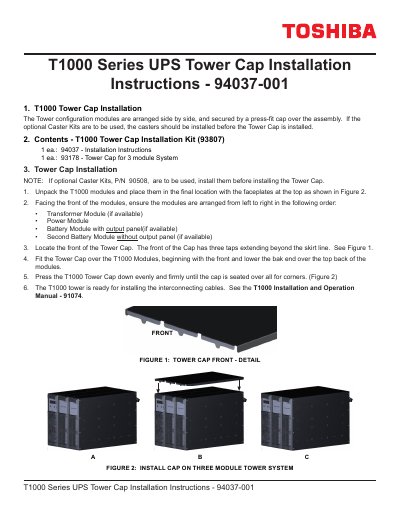
This document is the T1000 Series UPS Tower Cap Installation Instructions, document number 94037-001. It explains that the tower configuration modules are arranged side by side and secured by a press-fit cap over the assembly.
The T1000 Tower Cap Installation Kit 93807 contains installation instructions 94037 and one Tower Cap 93178 for a 3 module system. The instructions cover optional caster kits, module placement order, fitting and pressing the cap into place, and the need to see the T1000 Installation and Operation Manual 91074 for interconnecting cables.
| Installation kit part number | 93807 |
|---|---|
| Tower cap part number | 93178 |
| System configuration | 3 module system |
| Optional caster kit part number | 90508 |
The kit contains installation instructions 94037 and one Tower Cap 93178 for a 3 module system.
They should be installed before the Tower Cap is installed.
Press it down evenly and firmly until it is seated over all four corners.
The T1000 Installation and Operation Manual - 91074.