
Danish quick start guide for the Lumens PS760, covering package contents, startup, connections, and power settings.
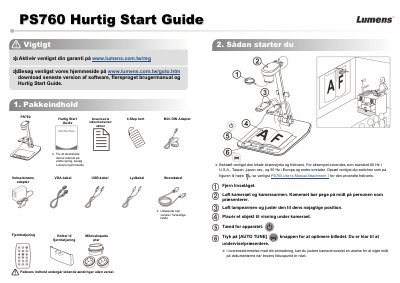
This quick start guide is for the Lumens PS760. It lists the package contents and gives startup steps such as removing the lens cap, positioning the camera and lamp arm, placing an object under the camera, turning on the unit, and pressing AUTO TUNE.
It also shows connection options to projectors, monitors, computers, interactive whiteboards, networks, TVs, HDTVs, and DVD players, plus notes on NTSC/PAL regions, power frequency, and DIP-switch setup.
| Video system | NTSC or PAL depending on region |
|---|---|
| Power frequency | 60 Hz in USA, Taiwan, and Japan; 50 Hz in Europe |
Press the [AUTO TUNE] button.
From the Lumens website.
The package includes a 4-step card, Mini DIN adapter, power cable, audio cable, USB cable, VGA cable, AC adapter, remote control, remote control holder, and microscope adapter.
Set it as shown in the figure and check PS760 User's Manual Attachment 1 for the frequency used in your region.