
Lumens LC200 Quick Operation Guide

This guide provides quick operation instructions for the Lumens LC200, covering product functions, on-screen menus, web management, and streaming settings.
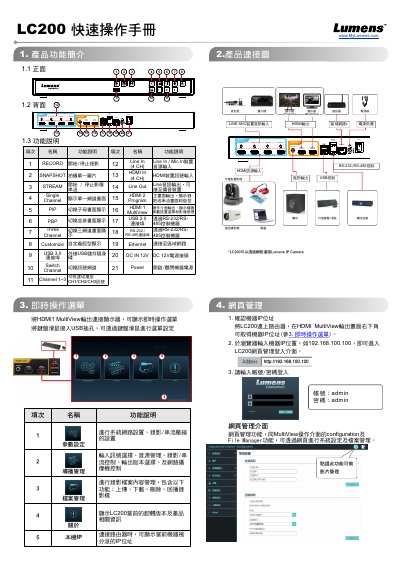

Lumens LC200 Quick Operation Guide - cover page
Brand
Lumens
Category
Other Electronics
Document type
User Manual
Language
Chinese
Pages
2
File format
PDF
File size
1.3 MB
Published
11 November, 2026
Updated
11 November, 2026
Model
LC200
MD5 checksum
1EDE93270EDEA2EE014CD4AF6B9D2CD5

About this manual

The Lumens LC200 is a device designed for installation, operation, and management, featuring functions such as recording, snapshot capture, and streaming. The device supports multiple HDMI inputs, audio inputs/outputs, and various display modes including Single Channel, PIP, PBP, and Three Channel layouts. This manual is written in Chinese.

What's inside

  • Product Connection Diagram
  • Product Function Introduction
  • Instant Operation Menu
  • Web Management
  • Director Management Settings
  • Network Camera and Streaming Settings
  • File Management
  • System Settings

Frequently asked questions

What is the power requirement for the LC200?

The LC200 requires a 12V DC power connection.

What are the default login credentials for the web management interface?

The default username is admin and the password is admin.

What is the default password for adding a Lumens network camera?

The default password for a Lumens network camera is 9999.

Download PDF (1.3 MB)

More Lumens Manuals


View all Lumens manuals →