
Quickly configure the JVC zRAMP-2/4 video‑over‑IP server, including network settings, port forwarding, and input/output setup.
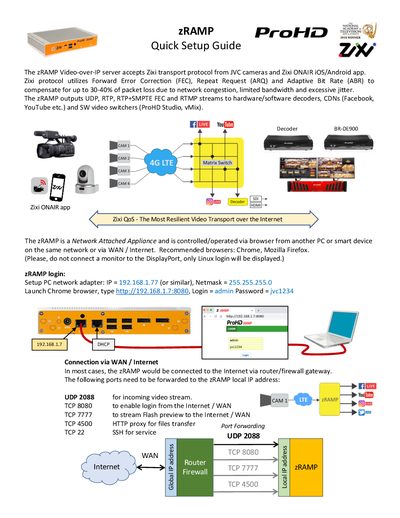
The zRAMP‑2/4 is a network‑attached video‑over‑IP appliance that receives Zixi streams from JVC cameras or the Zixi ONAIR app and forwards them via UDP, RTP, RTMP and other protocols. It is managed through a web browser on a PC or smart device on the same LAN or via WAN/Internet.
This guide explains how to set the server’s IP address, forward required ports, add inputs and outputs, and use the built‑in preview features. It also lists supported protocols, licensing options, and key features such as error correction and network bonding.
| Number of inputs | 2 (zRAMP‑2) or 4 (zRAMP‑4) |
|---|---|
| Number of outputs | 2 (zRAMP‑2) or 4 (zRAMP‑4) |
Open a browser on a PC on the same network and go to http://192.168.1.7:8080, then log in with user admin and password jvc1234.
Yes, it can record streams as MPEG‑TS files on a local hard‑disk drive.