
Quick start guide for the Cypress CY8CKIT-042-BLE-A Bluetooth Low Energy Pioneer Kit, covering kit contents, demo steps, and pinouts.
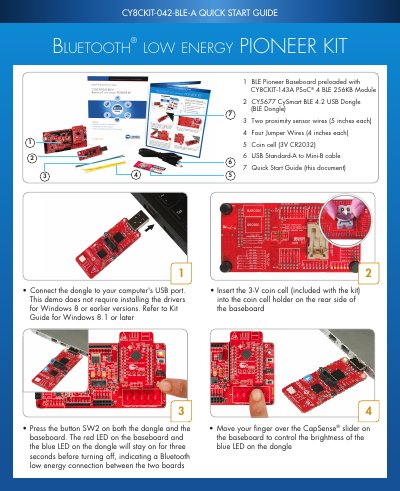
This quick start guide covers the Cypress CY8CKIT-042-BLE-A Bluetooth Low Energy Pioneer Kit, including its included baseboard, dongle, wires, coin cell, USB cable, and guide. It describes an out-of-box demo that connects the dongle and baseboard and uses the baseboard CapSense slider to control the dongle LED brightness.
The guide also provides feature lists and pinout descriptions for the CySmart USB dongle, the PSoC 4 BLE 256KB module, and the BLE Pioneer baseboard, plus Arduino-compatible pin definitions for the baseboard.
| Baseboard module | CY8CKIT-143A PSoC 4 BLE 256KB Module |
|---|---|
| USB dongle | CY5677 CySmart BLE 4.2 USB Dongle |
| Proximity sensor wires | Two, 5 inches each |
| Jumper wires | Four, 4 inches each |
| Coin cell | 3 V CR2032 |
| USB cable | Standard-A to Mini-B |
| Dongle PSoC 4 BLE device | CY8C4248LQI-BL583 |
| PSoC 5LP programmer | CY8C5868LTI-LP039 |
| F-RAM | Cypress F-RAM 1 Mb (FM24V10-G) |
| PSoC 4 BLE processor | 48-MHz ARM Cortex-M0 |
| BLE radio | BLE 4.2 |
| ADC | 12-bit |
| Current DACs | 2 |
| Low Power Comparators | 2 |
| Low Power Opamps | 4 |
| Timer/Counter/PWMs | 4 |
| Universal Digital Blocks | 4 |
| Serial Communication Blocks | 2 |
The kit includes a BLE Pioneer Baseboard preloaded with a PSoC 4 BLE module, a CySmart BLE 4.2 USB dongle, two proximity sensor wires, four jumper wires, a 3 V coin cell, a USB cable, and this quick start guide.
Insert the included 3 V coin cell, connect the dongle to a USB port, then press SW2 on both boards; the red baseboard LED and blue dongle LED stay on for three seconds to indicate a connection.
Download and install them from www.cypress.com/CY8CKIT-042-BLE-A.
The dongle uses the CY8C4248LQI-BL583 PSoC 4 BLE device.