
The Dell XPS 8900 Quick Start Guide provides instructions on how to connect the keyboard and mouse, connect the network cable, connect the display, connect the power cable and press the power button, set up a password for Windows, and connect to a network.
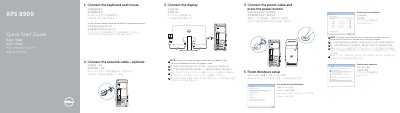
This quick start guide covers initial setup of the Dell XPS 8900 desktop computer, including connecting the keyboard, mouse, optional network cable, display, and power cable, then finishing Windows setup.
It also identifies the computer's external features and ports and points to Dell support, manuals, and regulatory information.
| Optical-drive bays | 2 |
|---|---|
| USB 3.0 ports (front) | 2 |
| Optical-drive eject buttons | 2 |
| USB 2.0 ports (rear) | 2 |
| USB 3.0 ports (rear) | 4 |
| Audio ports | 6 |
| Expansion-card slots | 4 |
Connect the display to the discrete graphics card.
Click Start, then All Programs, then Dell Help Documentation.
Visit Dell.com/support and Dell.com/support/manuals.