
The Dell OptiPlex 7050 Micro PC Quick Start Guide describes how to connect the keyboard and mouse, connect the network cable, connect the display, connect the power cable and press the power button, and complete the operating system setup.
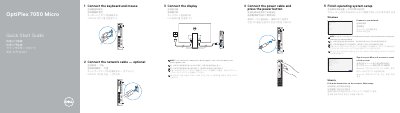
This is Dell's Quick Start Guide for the OptiPlex 7050 Micro computer, printed in Simplified Chinese, Traditional Chinese, Japanese, Korean and English. It presents numbered steps for setting up the computer: connecting the keyboard and mouse, connecting the network cable (optional), connecting the display, connecting the power cable and pressing the power button, and finishing operating system setup.
The guide also shows where to find Dell apps such as SupportAssist, and it labels the computer's features, including the power button and light, hard drive activity light, headset port, line-out port, USB 3.0 Type-C port, USB 3.0 ports with PowerShare and Smart Power On, optional antenna SMA connector and optional VGA/serial/PS/2/DisplayPort, Kensington security cable slot, padlock ring, cable holder, DisplayPort, HDMI port, power connector port and network port. Support, contact, regulatory and safety information is listed at the end. This manual is written in Chinese.
| Computer model | OptiPlex 7050 Micro (D10U) |
|---|---|
| Rated voltage | 100 - 240 V |
| Rated frequency | 50 - 60 Hz |
| Rated input current | 4 A |
Connect the display to the discrete graphics card.
Enter the password for the wireless network access when prompted.
Follow the instructions on the screen to finish setup.
Dell lists product support and manuals at Dell.com/support/manuals.