
The Dell Precision Tower 7910 Quick Start Guide provides information on how to set up and use the Dell Precision Tower 7910 desktop computer.
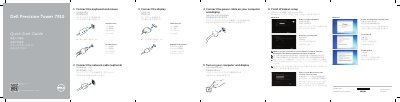
This two-page Dell quick start guide walks through the initial setup of the Dell Precision Tower 7910 computer. It shows how to connect the keyboard and mouse using either a USB or PS/2 connector, connect the network cable (optional), connect the display with a DVI or DisplayPort connector, connect the power cables for the computer and display, and turn both on. It then covers finishing Windows setup: connecting to a network, signing in with a Microsoft account or creating a local account, enabling security and updates, and creating a user name, computer name and password, with separate notes for Windows 8 and Windows 7.
The second page lists the features of the computer by number, including the power button and power light, USB 3.0 and USB 2.0 connectors, optical drive and eject buttons, hard-drive activity light, microphone, headphone, line-in and line-out connectors, serial connector, power-supply unit release latch, power cable connector, hard drive access cover-release latch, expansion card slots, security cable slot, padlock ring, network connectors and PS/2 keyboard and mouse connectors. Support links, the regulatory model D02X and regulatory type D02X003 are also given.
No, connecting a network cable is optional.
Connect the power cable on your computer and display.
Sign in to your Microsoft account or create a local account.
Dell Precision Tower 7910.