
This document provides a quick start guide for Dell computers, including how to connect the keyboard and mouse, power cord, display, and network cable.
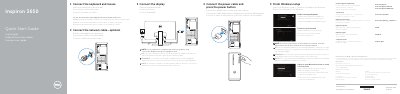
This guide covers initial setup of the Dell Inspiron 3650 desktop computer, including connecting the keyboard, mouse, power cable, display, and optional network cable. It also describes finishing Windows setup, enabling security and updates, connecting to a network, and signing in to a Microsoft account or creating a local account.
The document lists the computer's front and rear features and ports, including USB, HDMI, VGA, audio, network, and expansion-card connections, and provides links for product support, manuals, regulatory information, and Dell applications.
| Computer model | Inspiron 3650 |
|---|---|
| Regulatory model | D19M |
| Input voltage | 100 VCA–127 VCA / 200 VCA–240 VCA |
| Input frequency | 50 Hz–60 Hz |
| Input current consumption | 7.0 A / 3.5 A / 4.0 A |
| Country of origin | Made in China and Mexico |
| USB 3.0 ports | 2 |
| USB 2.0 ports | 4 |
| Audio ports | 3 |
| Optical drive | Optional |
Connect the display to the discrete graphics card if the computer was ordered with one; otherwise use the computer's display connection.
Enter the password for wireless network access when prompted during setup.
Finish Windows setup, enable security and updates, connect to your network, and sign in to your Microsoft account or create a local account.
Support and manuals are available at Dell.com/support and Dell.com/support/manuals.