
Inspiron 24 5000 Series Ubuntu Quick Start Guide.
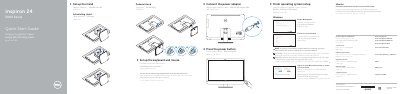
This Dell quick start guide covers the initial setup of the Inspiron 24 5000 Series Ubuntu all-in-one desktop, computer model Inspiron 24-5459 (regulatory model W12C, regulatory type W12C004). It walks through setting up the keyboard and mouse, fitting the pedestal or articulating stand, connecting the power adapter and pressing the power button, then following the on-screen instructions to finish operating system setup, including enabling Dell updates, connecting to a network, and signing in with a Microsoft account or creating a local account. It also points to the Dell apps in Windows, creating recovery media, registering the computer, SupportAssist and Dell support pages. The instructions appear in several languages.
The second page identifies the features of the computer: left and right microphones (for touch and non-touch screens), camera-status light, camera, media-card reader, two USB 3.0 ports, headset port, Service Tag label, power-adapter port, network port, four USB 2.0 ports, HDMI-in port, HDMI-out port, audio-out port, power button, screen-off button, two brightness-control buttons and an optional optical drive. It also shows the tilt of the pedestal stand and the articulating stand.
| Computer model | Inspiron 24-5459 |
|---|---|
| Regulatory model | W12C |
| Regulatory type | W12C004 |
| USB 3.0 ports | 2 |
| USB 2.0 ports | 4 |
| HDMI ports | HDMI-in and HDMI-out |
| Optical drive | Optional |
| Stand tilt | 5°, 30°, 60° |
Dell lists Dell.com/support and Dell.com/support/manuals, along with Dell.com/support/windows and Dell.com/support/linux, under product support and manuals.
In the Windows search, type Recovery, click Create a recovery media, and follow the instructions on the screen.
Enter the password for the wireless network access when prompted.
You follow the instructions on the screen to finish setup, then finish operating system setup.