
Dell Vostro 3800/3900/3900G/3902 Quick Start Guide
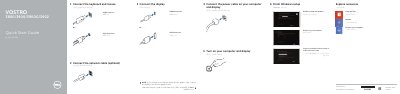
The guide provides step-by-step instructions for setting up the Dell Vostro 3800, 3900, 3900G, and 3902 desktop computers. It covers connecting the keyboard and mouse, network cable, display (HDMI or VGA), power cable, turning on the computer, and completing Windows setup including security updates, network connection, and Microsoft account sign-in.
The document also illustrates the front and rear features of each model, listing connectors such as USB 2.0, USB 3.0, HDMI, VGA, audio jacks, expansion card slots, and media card reader. It includes links to product support, manuals, regulatory compliance information, and the regulatory model numbers (D08D, D17M; D08D001, D17M001).
| Optical drive | Optional |
|---|---|
| Power button | With power light |
| Hard-drive activity light | Present |
| Power-supply diagnostic light | Present |
| Voltage selector switch | Present |
| USB 2.0 connector | Present |
| USB 3.0 connector | Present |
| HDMI connector | Present |
| VGA connector | Present |
| Network connector | Present |
| Expansion card slots | Present |
| Security cable slot | Present |
| Media card reader | Present |
Connect the display using the HDMI or VGA connector; if the computer has a discrete graphics card, connect the display to the discrete graphics card.
Visit dell.com/support or dell.com/support/manuals for product support and manuals.
The regulatory model and type are D08D, D17M (D08D001, D17M001).
This guide covers the Vostro 3800, 3900, 3900G, and 3902 models.