
OptiPlex 5050 Small Form Factor Quick Start Guide
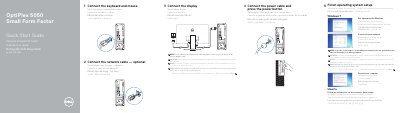
The Dell OptiPlex 5050 Small Form Factor Quick Start Guide shows how to connect the keyboard and mouse, optional network cable, display, and power cable, then press the power button. It also covers finishing Windows 7 or Ubuntu setup, setting a Windows password, connecting to a network, and protecting the computer.
The guide lists the computer's ports and features, including optional optical drive, USB 2.0 with PowerShare, power button and power light, line-out port, hard drive activity light, HDMI port, optional memory card reader, DisplayPort, headset port, serial port, USB 2.0 port, PS/2 keyboard port, USB 3.0 ports, USB 2.0 ports with Smart Power On, expansion card slots, power connector port, power supply diagnostic light, cable cover lock slot, release latch, optional VGA port, PS/2 mouse port, network port, Kensington security cable slot, and padlock ring. It also gives Dell support and regulatory compliance links.
| Computer model | OptiPlex 5050 SFF |
|---|---|
| Optical drive | Optional |
| Memory card reader | Optional |
| VGA port | Optional |
| USB 3.0 ports | Yes |
| Serial port | Yes |
| PS/2 keyboard port | Yes |
| Network port | Yes |
| Power supply diagnostic light | Yes |
Connect the display to the discrete graphics card.
Connect the power cable and press the power button.
Enter the password for the wireless network access when prompted.
Product support and manuals are available at Dell.com/support/manuals.