
The Dell™ Axim™ X30 is a powerful handheld device with the following features: 1. Install the battery. 2. Connect the AC adapter and charge the device for at least 8 hours for the first charge. NOTICE: To avoid damaging the connector, perform the following step before pulling the connector out of the device. 3. After the battery is charged, remove the AC adapter by pressing the two buttons on the sides of the connector to release the self-lock structure. 4. Press the power button and follow the instructions on the screen. NOTICE: First charge the battery for at least 8 hours.
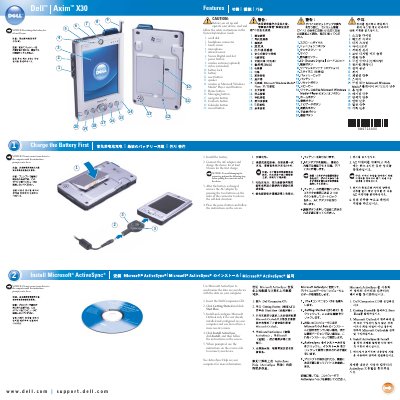
This Dell Axim X30 guide describes first-time setup: installing the battery, charging it for at least eight hours, and following the on-screen instructions after pressing the power button. It also lists device features such as the scroll dial, touch screen, headphone connector, microphone, infrared sensor, Secure Digital card slot, power button, wireless antenna, stylus, battery lock, reset button, and speaker.
The guide explains installing Microsoft ActiveSync using the Dell Companion CD and connecting the device with either the sync cable or the cradle. It also gives additional information on finding the Owner’s Manual and Pocket PC Help, using the scroll dial and navigator button, dimming the display with the power button, and docking the device in the cradle.
| First charge time | At least 8 hours |
|---|---|
| Wireless antenna | Optional |
| Expansion slot | Secure Digital card slot |
Charge the device for at least 8 hours for the first charge.
Press the two buttons on the sides of the connector to release the self-lock structure.
Use Microsoft ActiveSync to synchronize the data on your device with the data on your computer.
Press and hold the power button; repeat to light the display.