
OptiPlex 5050 Small Form Factor Quick Start Guide
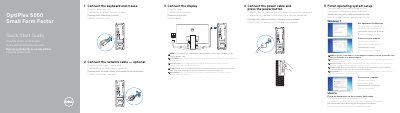
This Dell quick start guide gives connection steps for the OptiPlex 5050 Small Form Factor computer: connect the keyboard and mouse, connect the network cable if needed, connect the display (using the discrete graphics card if one is installed), connect the power cable and press the power button, then finish operating system setup. The setup section mentions Windows 7, including setting a Windows password and connecting to a network, and Ubuntu, where you follow the instructions on the screen. It also includes notes about secured wireless networks and protecting the computer.
The guide lists system features and ports, including an optional optical drive, USB 2.0 with PowerShare, power button and power light, line-out, hard drive activity light, HDMI, optional memory card reader, DisplayPort, headset, serial port, PS/2 keyboard and mouse ports, USB 3.0 and USB 2.0 ports, expansion card slots, power connector, power supply diagnostic light, cable cover lock slot, release latch, optional VGA port, network port, Kensington security cable slot, and padlock ring. It also gives Dell support and regulatory links and lists regulatory model D11S, regulatory type D11S002, and computer model OptiPlex 5050 SFF.
| Computer model | OptiPlex 5050 SFF |
|---|---|
| Optical drive | Optional |
| USB 2.0 port | With PowerShare |
| Memory card reader | Optional |
| Expansion slots | Expansion card slots |
| Power supply diagnostic light | Included |
| Security cable slot | Kensington security cable slot |
| Regulatory model | D11S |
| Regulatory type | D11S002 |
Connect the keyboard and mouse.
Connect the display to the discrete graphics card.
Follow the instructions on the screen to finish setup.
Use Dell.com/support, Dell.com/support/manuals, and Dell.com/support/windows.