
The TL-SG1005P is a 5-port Gigabit desktop PoE switch that can provide up to 30W of PoE power to connected devices. The switch also features overload protection and short circuit protection to ensure the safety of connected devices.
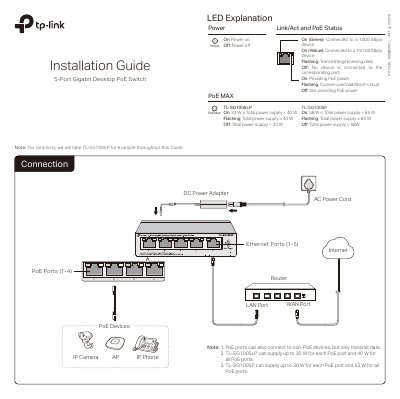
This is the TP-Link Installation Guide for the 5-Port Gigabit Desktop PoE Switch, written around the TL-SG1005P as the example model and also covering the TL-SG1005LP. It shows how the switch is connected between a router and PoE devices such as IP cameras and IP phones, and explains the Power, PoE MAX, and Link/Act and PoE status LEDs.
The guide also answers common questions about a Power LED that is not lit, a Link/Act LED that is not lit, and PoE ports that are not supplying power, including how port priority works when the PoE budget is exceeded. Safety information, wall-mounting requirements, specifications, and regulatory statements (EU declaration of conformity, FCC, Industry Canada, CE, BSMI) are included at the end.
| Standard Protocol | IEEE802.3i, IEEE802.3u, IEEE802.3ab, IEEE802.3x, IEEE802.3af, IEEE802.3at, IEEE802.1p; CSMA/CD |
|---|---|
| Interface | 5 10/100/1000 Mbps RJ45 Ports, Auto-Negotiation, MDI/MDIX |
| PoE Ports | Port 1 to Port 4; total power supply 40 W (TL-SG1005LP) / 65 W (TL-SG1005P) |
| PoE Power per Port | Up to 30 W for each PoE port |
| Switching Capacity | 10 Gbps |
| MAC Address Table | 2 K |
| Transfer Method | Store-and-Forward |
| Power Supply Output | 53.5 VDC / 0.81 A (TL-SG1005LP); 53.5 VDC / 1.31 A (TL-SG1005P) |
| Operating Temperature | 0 °C to 40 °C (32 °F to 104 °F) |
| Storage Temperature | -40 °C to 70 °C (-40 °F to 158 °F) |
| Operating / Storage Humidity | 10% to 90%RH non-condensing / 5% to 90%RH non-condensing |
| Wall Mountable | Yes; distance between mounting holes 52 mm |
Make sure the AC power cord is connected to the switch with a proper power source, that the supply voltage meets the switch input voltage requirement, and that the power source is on.
Check that the cable connectors are firmly plugged into the switch and the device, that the connected device is turned on and working normally, and that the cable is less than 100 meters (328 feet) long.
When the total power consumption of connected PoE devices exceeds the maximum, ports with smaller port numbers have higher priority and the system cuts off power to the ports with larger port numbers.
The TL-SG1005P can supply up to 30 W for each PoE port and 65 W for all PoE ports.