
The multi-function water quality detection pen can measure the TDS (dissolved total solids, units in ppm) value and conductivity (the conductivity of the solution, units in μS/cm) value of water, and judge the purity of water. It also has the function of detecting water temperature and ambient temperature.
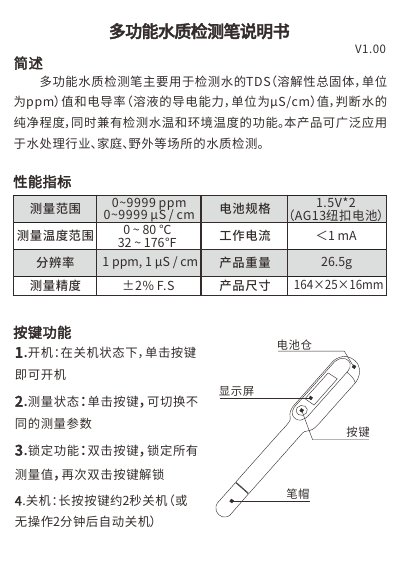
This is a short Chinese instruction sheet for a multi-function water quality detection pen. According to the text, the pen is used to measure the TDS value (total dissolved solids, in ppm) and the conductivity value (in μS/cm) of water to judge how pure the water is, and it can also measure water temperature and ambient temperature. It is described as suitable for water treatment work, household use and outdoor use.
The document lists the measuring ranges, resolution, accuracy, battery type, working current, weight and dimensions, then explains the single button: one click to switch on, further clicks to change the measured parameter, a double click to lock all readings, and a long press of about 2 seconds to switch off (or automatic switch-off after 2 minutes without operation). A second page gives the step-by-step measuring procedure, describes the battery compartment, cap, display, immersion line and low-battery indicator, and explains how to change the batteries. This manual is written in Chinese.
| TDS measuring range | 0 to 9999 ppm |
|---|---|
| Conductivity measuring range | 0 to 9999 μS/cm |
| Temperature measuring range | 0 to 80 °C / 32 to 176 °F |
| Resolution | 1 ppm, 1 μS/cm |
| Battery | 1.5 V × 2 (AG13 button cells) |
| Dimensions | 164 × 25 × 16 mm |
With the pen switched off, a single click of the button switches it on.
Click the button to cycle through the different measurement parameters.
Double-click the button to lock all measured values, and double-click again to unlock them.