
Instruction manual for the Kedida Electronics CT-6023/CT-6023L pen pH meter covering features, specifications, calibration, operation, and maintenance.
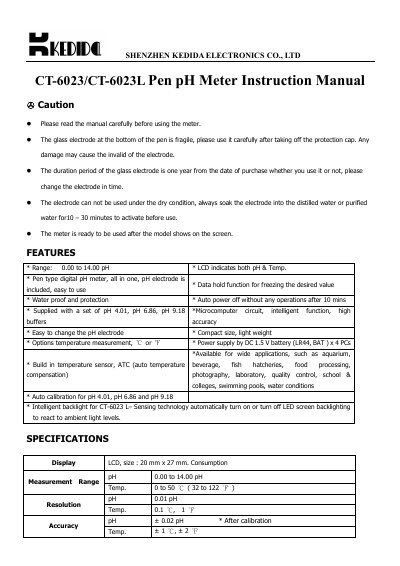
The Kedida Electronics CT-6023/CT-6023L is a pen-type digital pH meter with a built-in electrode, designed for measuring pH and temperature in various applications such as aquariums, food processing, laboratories, and swimming pools. It features a waterproof design, automatic temperature compensation, data hold, and auto power-off.
The meter supports three-point automatic calibration using pH 4.01, 6.86, and 9.18 buffers, and includes a set of buffer powders for preparation. The CT-6023L model adds an intelligent backlight that adjusts to ambient light. Maintenance requires keeping the glass electrode capped and soaked in distilled water when not in use, and the electrode should be replaced annually.
| Display | LCD, 20 mm x 27 mm |
|---|---|
| Measurement Range | pH 0.00–14.00; Temperature 0–50 °C (32–122 °F) |
| Resolution | pH 0.01; Temperature 0.1 °C / 1 °F |
| Accuracy | pH ±0.02 (after calibration); Temperature ±1 °C / ±2 °F |
| Calibration Points | 3 points (pH 4.01, 6.86, 9.18) |
| Operating Humidity | <80% RH |
| Dimensions | 188 x 38 mm (electrode included) |
| Weight | 82 g (electrode included) |
| Power Supply | 4 × LR44 1.5 V batteries |
| Auto Power Off | After 10 minutes of inactivity |
| Temperature Compensation | Automatic (ATC) with built-in sensor |
| Backlight (CT-6023L) | Intelligent auto on/off based on ambient light |
While the meter is off, press CAL and ON/OFF simultaneously until the unit appears, press HOLD to select, then press CAL to save.
Press HOLD to freeze the current reading; press again to release the hold mode.
The pH value is out of range (lower than 0 or higher than 14).