
Key facts
- Manuals
- 52
- Models
- 2
- Brands
- 24
- Languages
- ZH · EN · JA
- Last added
- 2026-10-02
Network Tools models by brand
Featured Network Tools manuals

Tenda PW3 PA3 1000M Wireless Router Powerline Kit User Manual
This manual introduces the PW3 wireless router and PA3 powerline adapter, describing their indicators, buttons and basic functions. It explains how the devices combine Wi‑Fi and HomePlug AV2 powerline technology to extend wired and wireless networks throughout a home.
Detailed sections cover hardware wiring options, PW3 and PA3 configuration steps, pairing procedures, Wi‑Fi scheduling, system management, and a troubleshooting appendix with common issues and solutions. This manual is written in Chinese.
Covers: Device Overview · Hardware Connection · PW3 Configuration · Pairing Procedure · PA3 Configuration · Appendix
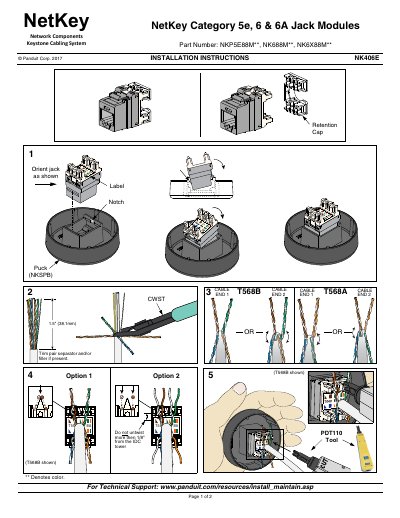
Panduit NetKey Keystone Cabling System Installation Instructions
The NetKey Keystone Cabling System provides Category 5e, 6 and 6A jack modules (NKP5E88M, NK688M, NK6X88M) for structured cabling installations. The guide explains how to orient the jacks, prepare cables, and terminate them according to industry standards.
Key steps include aligning the jack notch, trimming any pair separator, and using the recommended tools (e.g., PDT110). Installers must follow TIA/EIA‑568‑B guidelines, avoid untwisting more than 1/8" from the IDC tower, and observe safety cautions such as not working during lightning storms or in wet locations unless the jack is rated for wet use.
Covers: Technical Support · Installation Overview · Jack Orientation · Cable Preparation · Termination Procedure · Compliance Guidelines
TP-Link TL-WR720N 150Mbps Mini 3G Router User Manual
This manual provides step‑by‑step instructions for installing and configuring the TL‑WR720N 150Mbps mini 3G router. It explains the three operating modes—3G routing, wireless routing, and wireless AP—along with hardware connections, IP settings, and security options.
Additional sections cover advanced features such as DHCP, firewall, parental controls, and troubleshooting FAQs. The appendix lists detailed specifications and useful tools like MAC address lookup and browser settings. This manual is written in Chinese.
Covers: Detailed Configuration Guide Introduction · Product Overview · Hardware Description · Quick Installation Guide · Wireless AP Mode Configuration · 3G Routing and Wireless Routing Mode Configuration
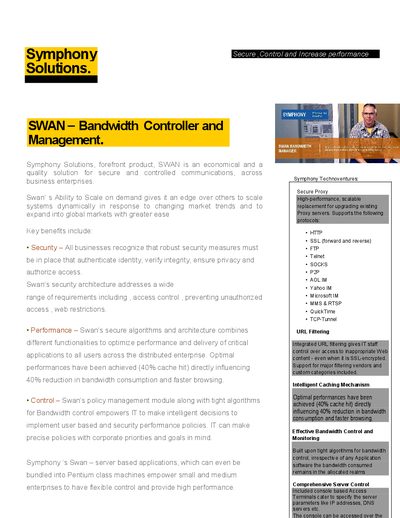
Symphony Solutions SWAN Bandwidth Controller Product Leaflet
The SWAN Bandwidth Controller is an economical solution for secure and controlled communications across business enterprises. It combines security, performance optimization, and policy‑based bandwidth control, offering features such as URL filtering, intelligent caching, and extensive reporting.
Management is provided through a web‑based interface, command‑line, SSH v2 and SSL/TLS, allowing administrators to define policies by user, group, time, traffic limits and more. The system supports a wide range of protocols and includes optional modules like bandwidth clubbing and DNS routing, with built‑in monitoring and logging capabilities.
Covers: Key Benefits · Performance and Reliability · Manageability – Policy Processing Engine · Authentication · Management Reporting · Support Services
Latest Network Tools manuals
Tenda PW3 PA3 1000M Wireless Router Powerline Kit User Manual
User Manual 46 pages · 3.8 MB · ZHThe Tenda PW3 PA3 1000M kit user manual explains device overview, hardware connection, configuration and troubleshooting for the wireless router and…
Panduit NetKey Keystone Cabling System Installation Instructions
Installation Guide 2 pages · 336 KB · ENInstallation instructions for Panduit NetKey Keystone Cabling System, covering jack orientation, cable preparation, termination, and TIA/EIA‑568‑B compliance.
TP-Link TL-WR720N 150Mbps Mini 3G Router User Manual
User Manual 134 pages · 2.7 MB · ZHDetailed configuration guide for the TP-Link TL-WR720N mini 3G router, covering setup, wireless AP mode, and 3G routing.
Symphony Solutions SWAN Bandwidth Controller Product Leaflet
Product Leaflet 4 pages · 248 KB · ENThe Symphony Solutions SWAN Bandwidth Controller provides secure, high‑performance bandwidth management, URL filtering, caching and detailed reporting for…
Alcatel-Lucent 7750 SR BGP Command Reference
Programming Manual 1 pages · 77 KB · ENReference guide for BGP commands on Alcatel-Lucent 7750 SR service routers.
Aurotek MCN8032P Network Card User Manual
User Manual 42 pages · 472 KB · ZHThis manual provides specifications, hardware components, interface details, and programming examples for the Aurotek MCN8032P network card.
Zone Labs Home Network Installation Guide
Installation Guide 4 pages · 1.1 MB · ENA step‑by‑step guide for setting up a wired, wireless, or hybrid home network.
bsecure online user manual
This document is the user manual for Bsecure Online version 6.1, including installation, control panel, features and advantages, configuration window, and activity monitoring.
apple Newton Internet Enabler User Manual
The Newton Internet Enabler (NIE) allows you to access the Internet using a Newton device with an Internet application program, such as NetHopper. NIE also enables you to access your company intranet (a private network within the company). To use NIE, you should be familiar with basic Newton functions (described in the documentation that came with your Newton device).
Hitachi Dynamic Link Manager Software User's Guide
This document is the user's guide for Hitachi Dynamic Link Manager software, which describes the features and characteristics of the software.
ASUS express gate Manual
This document describes the features and characteristics of ASUS Express Gate, which is an instant-on environment that provides quick access to several applications. It is entirely self-contained and can be used without entering the operating system of the Notebook PC.
Hitachi Dynamic Link Manager (HDLM) for IBM AIX Systems User Guide
This document is the User's Guide for Hitachi Dynamic Link Manager (HDLM) for IBM AIX Systems. It describes the features and characteristics of HDLM.
SAMSUNG Voice Mail Quick-Reference Guide
This document is a quick-reference guide for Samsung Voice Mail systems, providing instructions on how to access your mailbox from different devices such as desk phones, off-site phones, and other subscribers' phones.
nokia Mail for Exchange Frequently Manual
This document introduces the common problems and solutions of Nokia Mail for Exchange
ASUS AAM6000EV/B3 user manual
User Manual 20 pages · 575 KB · ZHThe ASUS AAM6000EV user manual provides installation steps, operation guidance, LED indicator meanings, specifications, and troubleshooting for the external…
Which document do I need?
User Manual
Day-to-day operation, settings and troubleshooting. Start here if the product is already set up.
Installation Guide
Mounting, wiring and first power-up. Read it before the hardware goes in.
Programming Manual
Instruction set, parameters and examples for configuring or programming the device.
Quick Start Guide
The shortest path to a working setup, usually only a few pages.
Service Manual
Disassembly, diagnostics and part numbers, for repair.
Questions answered in Network Tools manuals
How many times can the jack modules be re‑terminated?
The jack modules may be re‑terminated a minimum of 20 times.
From: Panduit NetKey Keystone Cabling System Installation Instructions
What cable types are compatible with the NetKey jack modules?
They accept PVC or Plenum rated 22‑26 AWG solid or stranded IWC cable.
From: Panduit NetKey Keystone Cabling System Installation Instructions
How do I reset the TL‑WR720N to factory defaults?
Press and hold the Reset button for about 5 seconds while the router is powered on; the status LEDs will flash quickly three times and the router will restore factory settings.
How can I find the MAC address of my computer on Windows?
Open the Network Connection Details page; the "Physical Address" (e.g., 00‑0A‑66‑EB‑54‑37) shown is the MAC address.
What protocols does the SWAN Bandwidth Controller support?
It supports HTTP, SSL (forward and reverse), FTP, Telnet, SOCKS, P2P, AOL IM, Yahoo IM, Microsoft IM, MMS & RTSP, QuickTime and TCP‑Tunnel.
From: Symphony Solutions SWAN Bandwidth Controller Product Leaflet
How can administrators manage the SWAN controller?
Administrators can use a web‑based management interface, a command‑line interface, SSH v2 or SSL/TLS to configure policies and monitor usage.
From: Symphony Solutions SWAN Bandwidth Controller Product Leaflet