
This is a quick start guide for an Optoma projector, which includes safety instructions, product features, usage tips, etc.
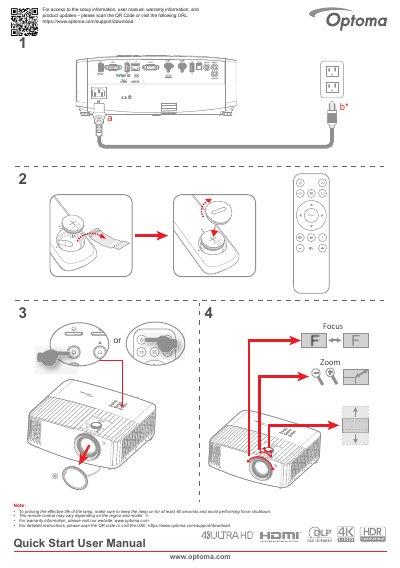
This is the Optoma quick start user manual for a projector. It shows numbered setup illustrations, focus and zoom labels, and connection labels, and notes that the lamp should stay on for at least 60 seconds to help prolong its effective life. It also covers remote control battery use and notes that the remote control may vary by region and model.
The manual includes safety information in several languages. It warns users not to look into the projector lens, block air vents, or open or disassemble the projector, and says the full safety information is in the user manual. It provides Optoma support download and warranty links.
Keep the lamp on for at least 60 seconds and avoid performing a force shutdown.
The manual shows CR2032 batteries.
Read the full safety information in the user manual.
Turn off the projector and unplug the power cord.