
This document introduces the use and precautions of STYLEVIEW
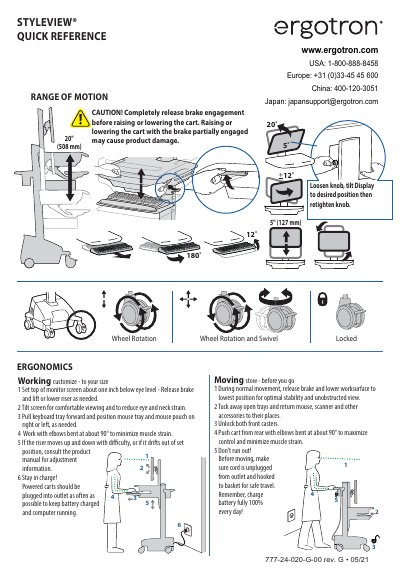
This guide provides quick instructions for setting up and adjusting the Ergotron STYLEVIEW® monitor arm. It covers screen positioning, keyboard tray use, and ergonomic posture. It also explains battery status indicators and charging procedures to ensure optimal performance and battery life.
Safety and maintenance tips are included, such as releasing the brake before moving the cart, unplugging cords before transport, and charging the battery to 100% daily to avoid damage or reduced lifespan. This manual is written in Chinese.
Set the top of the monitor screen about one inch below eye level. Release the brake and lift or lower the riser as needed. Tilt the screen for comfortable viewing.
Press the alarm mute button. It will temporarily mute the alarm, but only for 1 minute if the battery is below 5%.