
Ergotron ID Label Placement Guide

This guide helps users locate ID labels on various Ergotron products, including desk mounts, wall mounts, and carts, to identify part numbers and serial…
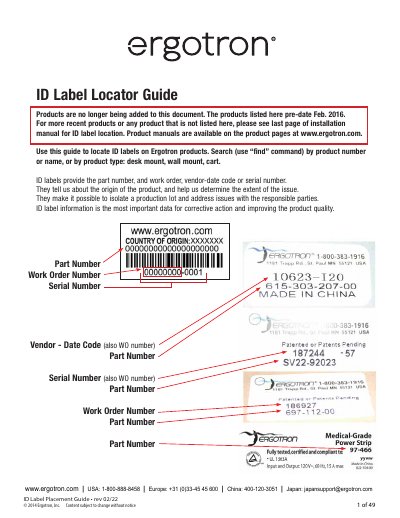

Ergotron ID Label Placement Guide - cover page
Brand
Ergotron
Category
Other Computer Accessories
Document type
User Manual
Language
English
Pages
49
File format
PDF
File size
1.9 MB
Published
29 October, 2026
Updated
29 October, 2026
MD5 checksum
14AB3EA283A2C98219F38C36150FB31E

About this manual

This document serves as a locator guide for identification labels found on Ergotron products. These labels contain critical information such as part numbers, work order numbers, vendor-date codes, and serial numbers, which are essential for identifying the product's origin and addressing potential issues. The guide covers a wide range of product types, including desk mounts, wall mounts, and mobile platforms.

What's inside

  • Desk Mounts
  • Wall Mounts
  • Carts
  • Neo-Flex Series
  • WorkFit Series
  • LX Series
  • StyleView Series
  • TeachWell Mobile

Frequently asked questions

Where can I find ID labels on Neo-Flex Combo Lift Stand products?

The ID label is located on the underside of the base.

Where is the ID label located on LX Triple/Widescreen Dual Display Lift Stand?

The label is found on the front cover, behind the mounted monitor.

How do I find the ID label on WorkFit-S Sit-Stand Workstations?

The label is located under the keyboard arm.

Where is the ID label placed on TeachWell Mobile Digital Platforms?

The label is located beneath the top cover.

Download PDF (1.9 MB)

More Ergotron Manuals


View all Ergotron manuals →