
Bosch Security Systems GV3 and GV4 Series Control Panels ROM Keys User Guide

This document introduces the features and usage of GV3 and GV4 series control panel ROM keys.

Bosch Security Systems GV3 and GV4 Series Control Panels ROM Keys User Guide - cover page
Brand
Bosch Security Systems
Category
Other
Document type
User Manual
Language
English
Pages
2
File format
PDF
File size
41 KB
Published
18 October, 2023
Updated
18 October, 2023
MD5 checksum
8B59CFDBCF5570202B814630AC70258E

About this manual

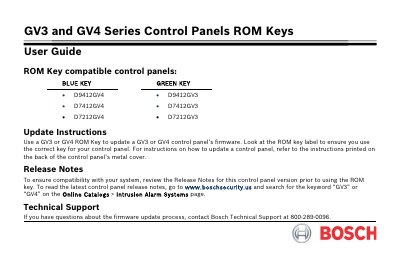
This document serves as a user guide for the ROM Keys compatible with the GV3 and GV4 Series Control Panels. It details the specific models supported by the Blue and Green keys and emphasizes the importance of verifying the key label against the control panel model before use.

What's inside

  • ROM Key compatible control panels
  • Update Instructions
  • Release Notes
  • Technical Support

Specifications

Compatible Control PanelsD9412GV4, D9412GV3, D7412GV4, D7412GV3, D7212GV4, D7212GV3

Frequently asked questions

How do I ensure I use the correct ROM key?

Look at the ROM key label to ensure you use the correct key for your control panel.

Where can I find instructions on how to update a control panel?

Refer to the instructions printed on the back of the control panel's metal cover.

Where can I find the latest release notes for the control panel?

Go to www.boschsecurity.us and search for the keyword “GV3” or “GV4” on the Online Catalogs > Intrusion Alarm Systems page.

Download PDF (41 KB)

More Bosch Security Systems Manuals


View all Bosch Security Systems manuals →