
This is a product manual for Saitek GM2 Action Pad and Mouse. It introduces the features of the product, including ultra-fast report rates, leading engineering, programmability, predefined game profiles, etc. It also provides information on product connection, system requirements and installation steps.
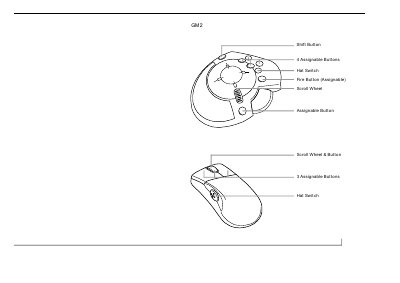
The document introduces the Saitek GM2 Action Pad and Mouse, a device designed specifically for first-person gamers. It details the hardware features of both the Action Pad (including 6 buttons, an 8-way hat switch, and a throttle wheel) and the integrated mouse (rotary scroll wheel, 3 buttons). The manual emphasizes that the product requires the Saitek Gaming Extensions (SGE) software from the Product Companion CD to function correctly.
| Buttons (Action Pad) | 6 buttons |
|---|---|
| Hat Switch (Action Pad) | 8-way hat switch |
| Throttle Wheel Options | Self-centering or freewheel options |
| Buttons (Mouse) | 3 buttons |
| Hat Switch (Mouse) | 4-way hat switch |
| Programmable Commands | up to 40 programmable commands |
You must install the product driver and Saitek Gaming Extensions (SGE) from the Saitek Product Companion CD.
A Pentium class computer with 32Mb RAM, Windows 98 or 95, Microsoft Internet Explorer 4, and DirectX 7.0a.
Yes, you can connect a favorite mouse via PS/2, Serial, or another USB port simultaneously.