
S10 series sensor instruction manual, introduces the sensor's control, connection, size and technical data.
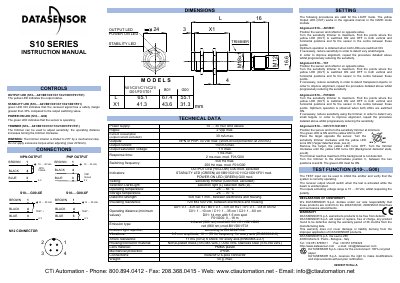
This document is the instruction manual for the Datasensor S10 Series of proximity sensors. It details the functions of the various LEDs (Output, Stability, Power On) and the sensitivity trimmer found on different models. The guide explains how to connect the sensors using M12 connectors and provides specific alignment procedures for different model variants (A01/B01, T01, F01/G00, C01/C11/C21/D01).
| Power supply | 0...30 Vdc |
|---|---|
| Ripple | 2 Vpp max. |
| Current consumption | 30 mA max. |
| Output current | 150 mA max. |
| Output saturation voltage | 1V max. |
| Response time | 1ms max. |
| Switching frequency | 250 Hz max. |
| Operating temperature | -25 ... 55 °C |
| Storage temperature | -25 ... 70°C |
| Mechanical protection | IP69K |
| Weight | 50g. max. |
The maximum output current is 150 mA.
The operating temperature range is -25 to 55 °C.
The warranty period is 36 months from the manufacturing date.