
This guide provides an overview of how to use VWorks Automation Control software. The overall workflow is: 1. Add devices. 2. Create a protocol. 3. Add tasks. 4. Compile the protocol and simulate the protocol run. 5. Start, pause, and stop the protocol run.
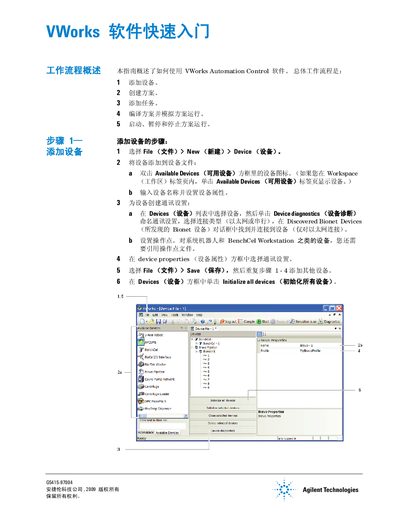
This document provides a quick start overview of the Agilent VWorks Automation Control software. It details the five-step workflow: adding devices, creating protocols, adding tasks, compiling and simulating the protocol, and finally starting, pausing, or stopping the execution.
The guide includes specific instructions on configuring device communication settings (Ethernet or Serial), setting up process parameters for labware, and managing task parameters such as aspiration volumes and plate types. It also covers how to compile protocols to check for errors and use simulation mode to identify potential deadlocks before running the actual automation sequence. This manual is written in Chinese.
The workflow consists of adding devices, creating protocols, adding tasks, compiling and simulating the protocol, and finally starting, pausing, or stopping the protocol run.
Configured labware returns to its starting position after the protocol run is complete.
You must view and correct any deadlock errors listed in the Main Log tab before proceeding.