
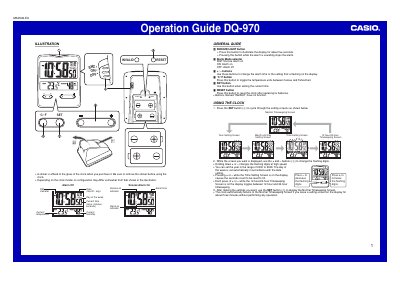
The Casio DQ-970 is a digital clock with a temperature and humidity display. This two-page Operation Guide explains the buttons and shows how to set the current time, including year, month/day, and 12-hour/24-hour timekeeping.
The guide also covers alarm time setup and the SNZ/ON/OFF alarm selector, stopping the alarm, the SNOOZE/LIGHT button, thermometer and hygrometer functions, switching between Celsius and Fahrenheit, and battery replacement with a RESET step.
| Light duration | About five seconds |
|---|---|
| Year setting range | 2000 to 2039 |
| Low humidity display threshold | Below 10% shows LO |
| High humidity display threshold | Above 90% shows HI |
| Battery replacement interval | At least once a year |
Press the °C/°F button to toggle the temperature units between Celsius and Fahrenheit.
Press the SNOOZE/LIGHT button; if snooze is on, the alarm sounds again in about five minutes.
Press the RESET button after loading a full set of new batteries.