
This is the installation guide for the Linksys 942 IP Phone
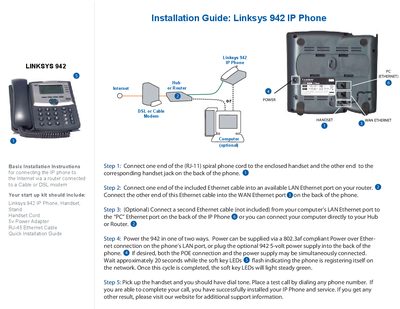
The Linksys 942 IP Phone comes with a handset, stand, handset cord, power adapter and Ethernet cable. This guide walks you through connecting the phone to a router, modem, and optional PC.
Follow the five steps: connect the handset cord, attach the Ethernet cable to the router and phone, optionally link a PC, power the phone via PoE or the 5‑V adapter, and verify operation with a test call.
| Power supply | 5‑volt optional power adapter |
|---|---|
| Power over Ethernet | 802.3af compliant |
| Handset cord | RJ‑11 spiral phone cord |
| Network cable | Included RJ‑45 Ethernet cable |
Connect one end of the RJ‑11 spiral phone cord to the handset and the other end to the handset jack on the back of the phone.
The phone can be powered via a PoE‑compatible 802.3af Ethernet port or by plugging in the optional 5‑volt power adapter; both can be used simultaneously.