
This document describes the installation method of the Linksys SPA2102 adapter provided by Yak. The document mentions the required devices and connection methods.
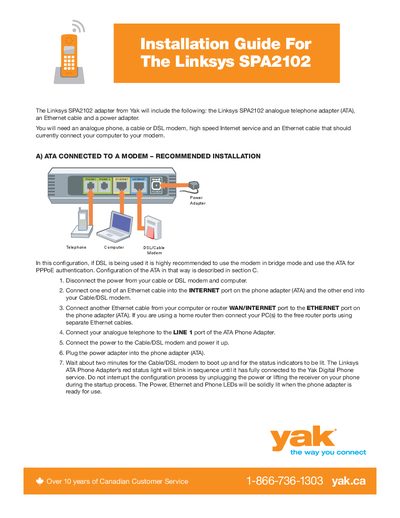
This guide explains how to install the Linksys SPA2102 ATA. It provides step‑by‑step instructions for the recommended connection to a DSL or cable modem, including wiring the Ethernet and phone ports, powering the device, and interpreting the status LEDs.
It also covers alternative router connections (not recommended), how to determine the ATA’s IP address, and how to configure DSL credentials via the web interface. Detailed instructions for changing the WAN connection type to PPPoE and entering your DSL username and password are included.
Connect an Ethernet cable from the ATA’s INTERNET port to the modem, another Ethernet cable from the computer or router to the ATA’s ETHERNET port, plug the telephone into LINE 1, and power the modem and ATA; the red status light will blink until the device is fully connected.
The red status light blinks in sequence while the ATA is establishing a connection; it stays solid when the device is ready for use.