
This quick start guide explains how to charge the Philips PET717 Portable DVD Player, install the remote control battery, play discs, and connect to a TV.
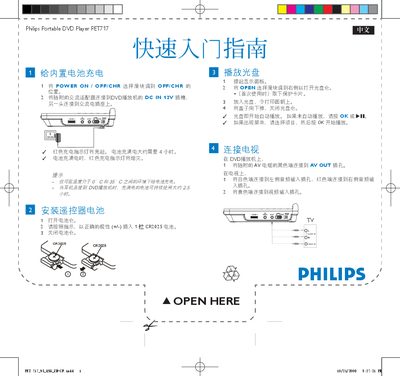
The guide explains how to power on the device, insert a disc, and start playback. It also covers charging the built‑in battery, which takes about four hours, and how to connect the player to a TV using the AV cable.
Additional sections describe the remote‑control battery replacement (CR2025) and basic troubleshooting steps such as using the OK button when a menu appears. This manual is written in Chinese.
| Battery charging time | ≈ 4 hours |
|---|---|
| DC input voltage | 12 V |
| Remote control battery type | CR2025 |
Slide the power switch to the ON position on the right side of the device.
Charging the built‑in battery takes about four hours.
Connect the black end of the AV cable to the AV OUT jack and the red end to the audio input on the TV.
Open the battery compartment, insert a CR2025 battery with the correct polarity (+/‑), and close the compartment.