
This Quick Start Guide explains how to use the Philips AC4076 Air Purifier.
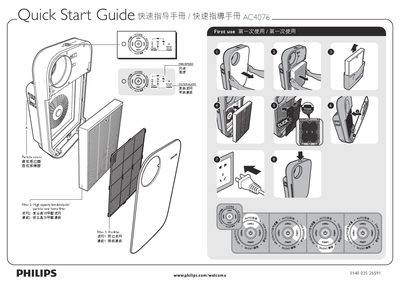
This guide provides the essential steps to get the Philips AC4076 air purifier up and running. It explains the first‑use procedure, how to adjust fan speed, and the functions of the cleaning sensor and smart lock.
The manual also details how to replace the two filters (Filter 1 and Filter 2) and offers tips for cable storage and where to find more information about the device. This manual is written in Chinese.
Follow the steps shown under the "Filter replacement" section to remove the old filter and install the new one.
The cleaning sensor monitors particle levels and alerts you when the filter needs cleaning or replacement.
Select "First use" in the guide, then set the desired fan speed to begin operation.