
This document introduces the product features of the 'Crane 2S' gimbal, including the gimbal's functions, features, and advantages.
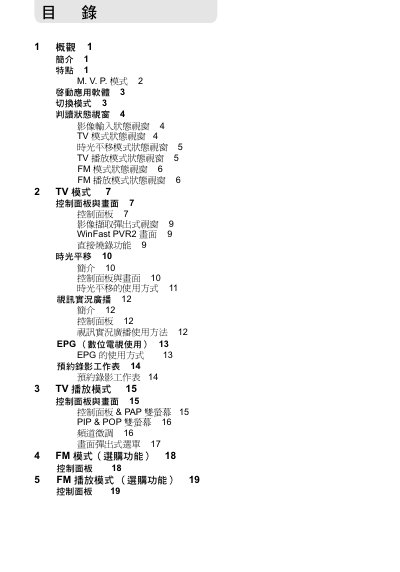
The WinFast PVR2 software provides a full multimedia experience, allowing users to watch digital and analog TV, listen to FM radio, record programs, and use dual‑screen modes such as PIP, POP and PAP. It also includes DirectBurn for instant VCD/DVD creation and supports HDTV, AC3 audio and various MPEG codecs.
This manual guides users through installation, initial startup, mode selection, remote‑control operation, keyboard shortcuts, channel scanning, EPG usage, audio/video settings, and recording functions. Each section includes step‑by‑step instructions and screen‑shot references to help users get the most out of the application. This manual is written in Chinese.
| Supported video codecs | MPEG‑1, MPEG‑2, MPEG‑4 |
|---|---|
| Audio format support | AC3 (Dolby Digital) |
| FM broadcast support | Digital FM (not DAB) |
| Dual‑screen modes | PIP, POP, PAP |
Press the signal‑source switch key to enter TV mode.
While in TV mode, press the Time‑Shift button to enter time‑shift playback mode.