
This document provides the installation instructions for TP-LINK wireless network cards, including hardware installation and software installation.
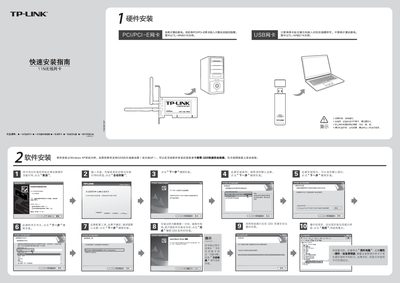
This quick installation guide explains how to physically install the TL‑WN821N PCI/PCI‑E wireless network card, including powering down the PC, inserting the card into the correct slot, and completing the driver installation from the supplied CD. It also covers software setup on Windows XP/7/Vista, with instructions for running the installer and handling digital‑signature prompts.
After the driver is installed, the guide shows how to use the QSS (Wi‑Fi Protected Setup) feature to securely connect to a compatible router, as well as manual configuration steps for selecting a network, entering passwords, and verifying connection status. This manual is written in Chinese.
Power off the computer, then insert the PCI/PCI‑E card into the appropriate slot, making sure it is oriented correctly.
When the prompt appears, choose “Continue” (仍然继续) to complete the installation.
Press the QSS button on the router for 2‑3 seconds, then press the QSS button on the card within 2 minutes, and follow the on‑screen prompts to establish a secure connection.