
This document describes the hardware installation steps of TP-LINK's wireless network card, including selecting the installation type, inserting the network card, and installing the software. It also introduces the methods of using QSS function to establish a secure connection with a wireless router.
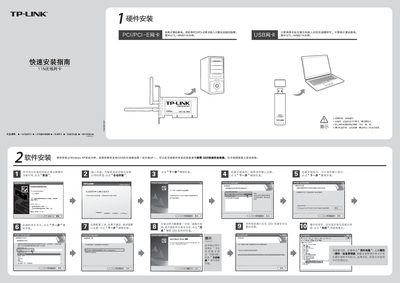
This guide walks you through the hardware and software installation of the TP‑Link TL‑WN821N 11N wireless network card. It covers inserting the card into a PCI/PCIe or USB slot, installing drivers on Windows XP/2000, and configuring the QSS (Quick Secure Setup) feature.
After installation you can verify the device in the Windows Device Manager, launch the client application, and connect to a wireless network using either manual configuration or the QSS button on a compatible router. This manual is written in Chinese.
| Interface | PCI/PCIe |
|---|---|
| Interface | USB |
You can insert the card without powering off; the guide says the card can be inserted in the correct direction without shutting down the computer.
Select "Continue" to proceed with the installation.
Press the QSS button on the router and then press the QSS button on the card within 2–3 seconds; the software will automatically configure a secure connection.