
The document contains some characters and codes, but there are no specific features or characteristics of a product.
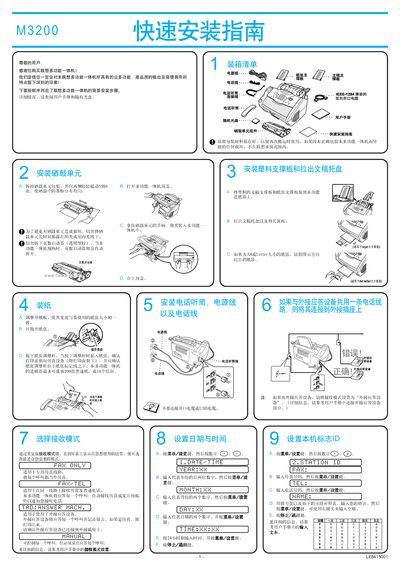
This service manual provides step‑by‑step instructions for installing the Lenovo M3200 laser multi‑function all‑in‑one device. It covers unpacking, loading the toner, configuring the paper tray, and preparing the machine for use.
The guide also details how to connect the device to a computer via parallel or USB cable, install the bundled drivers and software, and set up fax and scanning functions on Windows operating systems. This manual is written in Chinese.
| Paper Capacity | 200 sheets or 10 envelopes |
|---|---|
| Supported Paper Sizes | A4, Letter |
| Interface Options | IEEE 1284 parallel cable or USB cable (≤6 ft) |
Use an IEEE 1284‑compatible parallel cable or a USB cable no longer than 6 feet (1.8 m).
The feeder can hold up to 200 sheets of plain paper or 10 envelopes.