
ASRock Game Blaster is a sound card designed by ASRock. It has Creative Sound Core3D quad-core sound and voice processor, which can provide unbeatable sound quality and accurate 3D positional audio. It also boosts gaming performance, enables dual LAN with teaming function, and allows users to morph their voice into miscellaneous characters which is amusingly funny.
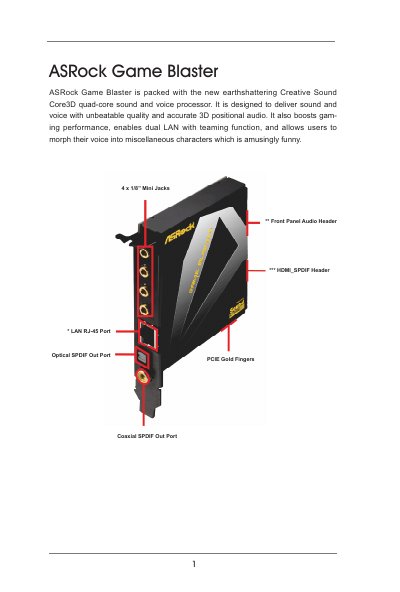
The ASRock Game Blaster is a PCI‑E sound card featuring Creative Sound Core3D quad‑core processor, high‑resolution DAC/ADC, and dual LAN support. This guide covers hardware installation, driver setup, and basic configuration steps.
Detailed sections explain LED indicators, audio output options, advanced features like THX TruStudio Pro, CrystalVoice, and user profile management, helping users optimize audio performance for games and multimedia.
| Platform size | 4.3‑in x 3.0‑in |
|---|---|
| Chipset | Creative Sound Core3D quad‑core sound and voice processor |
| DAC | 102 dB 24‑bit |
| ADC | 101 dB 24‑bit |
| LAN controller | Broadcom BCM57781, PCIe x1 Gigabit 10/100/1000 Mb/s |
| Supported OS | Windows 7, Windows Vista (32‑bit/64‑bit) |
Open Control Panel → Sound → Playback, right‑click the SPDIF‑Out device and choose “Set as Default Device”.
The CrystalVoice utility provides FX to morph your voice into different characters and accents.