
The Zhaoyang K70 series notebook computer adopts the latest Intel Pentium4-M 1.4G/1.6G notebook computer dedicated CPU, a 14.1-inch XGA TFT screen, and integrates hard disk, optical drive and floppy drive. It also has data transmission function, 3 large shortcut keys design, 163 Internet account binding, so that you can easily surf the Internet and send and receive emails. Zhaoyang K70 series new products fully reflect Lenovo's consistent pursuit of people-oriented and the pursuit of the best performance/price ratio, is your ideal choice for mobile office.
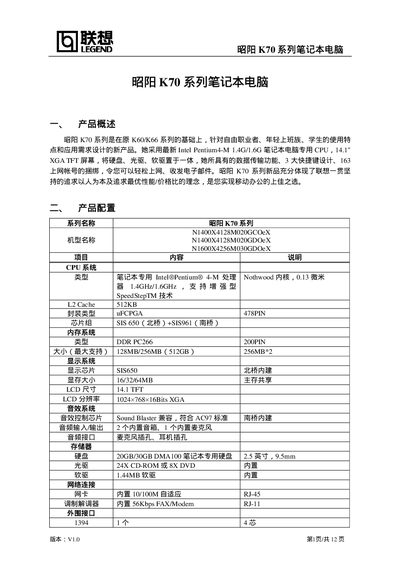
This manual provides an overview of the Lenovo K70 Series laptop, designed for freelancers, young professionals, and students. It highlights key features such as the Intel Pentium 4-M CPU, 14.1-inch XGA display, and unique shortcut keys for internet and email access. The document details the system configuration, including CPU, memory, storage, and connectivity options. This manual is written in Chinese.
| CPU | Intel Pentium 4-M 1.4GHz/1.6GHz |
|---|---|
| Display | 14.1 inch XGA (1024x768) |
| Memory | DDR PC266, Max 512MB |
| Hard Drive | 20GB/30GB |
| Optical Drive | 24X CD-ROM or 8XDVD |
| Operating System | Windows XP HOME |
| Weight | 3.2Kg |
The three shortcut keys allow for quick access to the Internet, email (Outlook Express), and a user-defined application like the screen saver.
The battery usage time is approximately 2.5 hours, depending on specific usage conditions.