
This document describes how to install Kies (PC Sync) software and provides detailed instructions on how to use Kies.
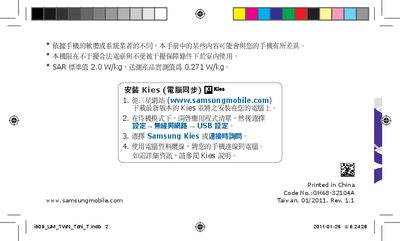
This manual guides users through installing Samsung Kies, configuring USB settings, and connecting the phone to a computer. It also outlines safety precautions, SAR limits, and legal notices for proper and safe use of the device.
The guide describes the phone’s menus, core applications such as Google Mail, YouTube, FM radio, and audio playback, and provides technical specifications like battery capacity and network power output. It includes copyright information and trademark acknowledgments for Samsung and third‑party technologies used in the phone. This manual is written in Chinese.
| Battery capacity | 3.7 V / 1500 mAh |
|---|---|
| SAR limit (standard) | 2.0 W/kg |
| SAR measured value | 0.271 W/kg |
| CDMA 800 MHz output power | 0.25 W |
| GSM 900 MHz output power | 2 W |
| GSM 1800/1900 MHz output power | 1 W |
Download the latest version of Kies from www.samsungmobile.com, install it on your PC, then connect the phone in standby mode and select the USB option in the Kies program.
The phone uses a 3.7 V, 1500 mAh battery.