
This manual introduces the basic operations and the meaning of some applications of Philips mobile phone.
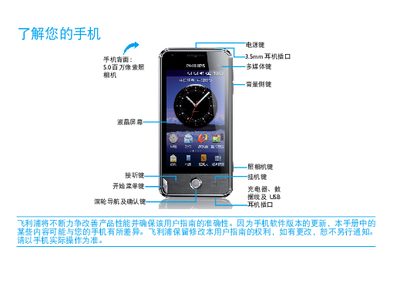
This manual introduces the Philips Xenium V816 smartphone, covering basic navigation of the home screen, key functions, and how to use built‑in applications such as the camera, messaging, and internet services. It also explains how to install the SIM card, charge the device, and synchronize data with a computer.
Additional sections give guidance on optimizing battery performance, managing connectivity (GSM, GPRS, EDGE, Wi‑Fi, Bluetooth, GPS), and safety precautions. Tips for reducing power consumption, using dual‑SIM features, and handling environmental regulations are also included. This manual is written in Chinese.
| Model | Xenium V816 |
|---|---|
| Network Support | GSM, GPRS, EDGE, Wi‑Fi |
| Dual SIM Dual Standby | Yes |
Turn off the phone, remove the battery cover, then insert the SIM card as shown in the manual.
Wait a few minutes (usually no more than five) before the charging icon appears, then connect the charger.
Set an appropriate profile, disable unused features such as Bluetooth, Wi‑Fi, GPS, and use only one SIM when possible.