
This is the user manual for Rapoo M2000 wireless mouse
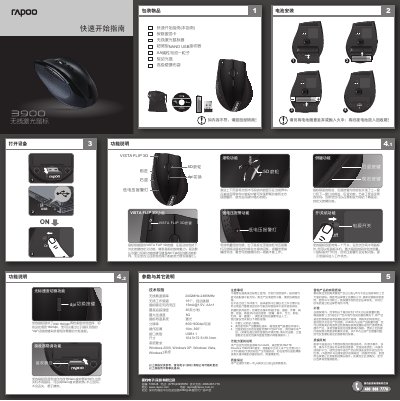
This manual covers everything you need to start using the Rapoo 3900 wireless laser mouse, including the contents of the package, battery installation, power switch operation, and the built‑in Nano receiver storage compartment. It also explains the mouse’s side buttons, DPI switching, 5‑direction scroll wheel, and low‑voltage warning light.
Technical specifications such as wireless frequency, tracking speed, acceleration, resolution, operating distance, and system requirements are listed, followed by safety precautions, wireless usage notes, and warranty details. The quick‑start guide at the end helps you get the mouse up and running quickly. This manual is written in Chinese.
| Wireless carrier frequency | 2402MHz-2480MHz |
|---|---|
| Wireless channels | 16 (auto‑hopping) |
| Rated current / voltage | 15 mA @ 1.5 V, AA×1 |
| Maximum tracking speed | 30 inches/second |
| Maximum acceleration | 8 G |
| Tracking system | Laser |
| Resolution | 800/1600 dpi (adjustable) |
| Operating distance | 10 m, 360° |
| Interface type | USB 1.1 |
| Dimensions (L×W×H) | 104.5 × 72.5 × 39.3 mm |
| System requirements | Windows 2000, XP, Vista, 7 and later |
Use the power switch on the bottom of the mouse; turning it off saves battery power.
Press the DPI switch on the top of the mouse to toggle between 800 dpi and 1600 dpi.
When the battery is low, the low‑voltage warning light flashes to remind you to replace the AA battery.