
M250 mouse user manual, introduces the mouse installation, use, precautions and so on
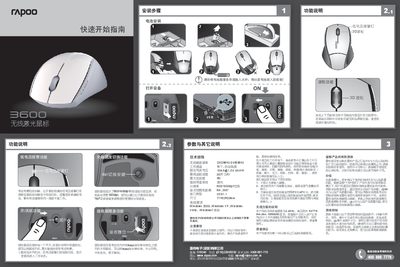
This Quick Start Guide introduces the Rapoo 3600 wireless laser mouse, describing its main functions such as low‑battery alarm, power‑off switch, DPI switching, and receiver hide feature. It also provides instructions for using the mouse and its receiver.
Technical specifications, system requirements, safety precautions, wireless compliance information, and warranty details are listed to help users set up and maintain the device safely. This manual is written in Chinese.
| Frequency | 2402MHz‑2480MHz |
|---|---|
| Channels | 16 (auto‑hopping) |
| Rated current/voltage | 15mA @ 1.5V (AAA x1) |
| Maximum tracking speed | 30 inches/s |
| Maximum acceleration | 86 |
| DPI settings | 800 / 1600 DPI |
| Interface | USB 1.41 |
| Dimensions | 77 × 53 × 29 mm |
| Receiver range | 8 m |
Press the "qn" button on the bottom of the mouse to toggle between 800 dpi and 1600 dpi.
The mouse operates on the 2.4 GHz band (2402 MHz‑2480 MHz).