
This document introduces the features and installation steps of a Rapoo wireless multimedia remote control keyboard. The keyboard has multimedia functions such as mute, volume increase, next song, play/pause, stop, and previous song, which can be operated through hotkey buttons. The keyboard is powered by two AAA alkaline batteries and comes with a mini wireless receiver. The installation steps include opening the device and installing the batteries. The keyboard has a multimedia trackball and integrated mouse functions, suitable for IBM-compatible computers and supports Win2000, XP, Vista systems.
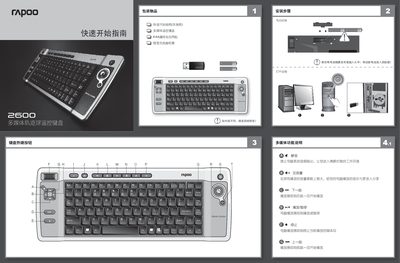
The Rapoo 2600 multimedia keyboard combines a full‑size keyboard, an optical trackball, and dedicated multimedia hot‑keys. It operates wirelessly at 2.4 GHz and connects to a computer via a USB 1.1 receiver. The manual provides quick‑start instructions, key function descriptions, and safety information.
The guide also lists the technical specifications, battery installation steps, and system requirements for Windows 2000/XP/Vista. Safety notes cover proper battery disposal and cautions when using the device near medical equipment such as pacemakers. This manual is written in Chinese.
| Working Voltage | 3.0 V |
|---|---|
| Battery Type | 2×AAA alkaline |
| Keyboard Working Current (trackball) | 14 mA |
| Receiver Input Current | 5 V DC, 30 mA |
| Interface Type | USB 1.1 |
| Keyboard Dimensions | W400 × D151 × H25 mm |
| Receiver Dimensions | W42 × D14.5 × H7 mm |
| Keyboard Weight | 0.580 kg |
| System Requirements | Windows 2000, XP, Vista |
| Wireless Frequency | 2.4 GHz |
It uses two AAA alkaline batteries.
Press the T key (keyboard switch) to turn the keyboard off.
The keyboard transmits at 2.4 GHz.
It works with Windows 2000, Windows XP, and Windows Vista.