
This manual describes the watch's timer function, including setting the digital time and date, switching between 12-hour and 24-hour time, setting the summer time (DST), and setting the pointer time.
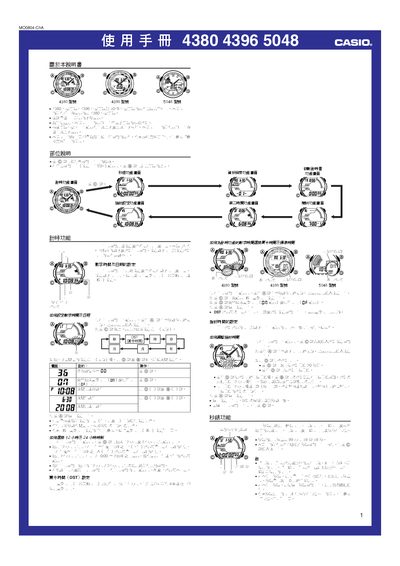
The Casio 4380/4396/5048 watches share the same button layout and display format. The manual provides step‑by‑step instructions for setting digital and analog time, configuring daylight‑saving time, and adjusting the watch hands.
Additional sections cover the stopwatch, countdown timer, multiple alarm types, illumination settings, memory management, data retrieval, and how to enable or mute button sounds. Each function is illustrated with screen diagrams and button‑press sequences. This manual is written in Chinese.
| Memory capacity | 60 records |
|---|---|
| Stopwatch limit | 99 h 59 m 59 s |
| DST offset | +1 hour |
| Year setting range | 2000‑2099 |
| Automatic calendar | Yes, adjusts month length and leap years |
| Illumination duration | 1.5 s or 3 s |
| Countdown timer range | 1 min – 24 h |
| Number of alarms | Up to 3 independent alarms |
Press and hold the A button until the seconds flash, then use the C button to select the field, and adjust the value with D (+) and B (‑). Press A again to exit the setting screen.
The watch memory can store up to 60 records.
From the stopwatch screen, press A to display the lap‑time screen, then press D to start/stop timing and press A again to record each lap.